


Introduction
PlayerUnknown’s Battlegrounds, widely known as PUBG, has evolved far beyond being just a battle royale shooter. Over the years, it has become a platform where creativity, personalization, and identity matter almost as much as survival skills. One of the most exciting aspects of this personalization is character and weapon customization. Players across the globe are fascinated by the idea of standing out on the battlefield with visually distinct outfits, weapons, and accessories.
Custom skins allow players to express individuality while maintaining competitive gameplay. However, designing personalized cosmetics in PUBG is not as straightforward as many assume. There are technical rules, artistic limitations, official policies, and platform-specific restrictions that must be followed.
This in-depth guide explains the complete process from understanding the PUBG skin ecosystem to designing, testing, and legally submitting your own creations. Whether you are a graphic designer, a 3D artist, or a passionate gamer, this article will help you understand how the system truly works.
Understanding PUBG Skins and Customization
What Are Skins in PUBG?
Skins are cosmetic modifications that change the visual appearance of in-game items without affecting gameplay mechanics. These include:
-
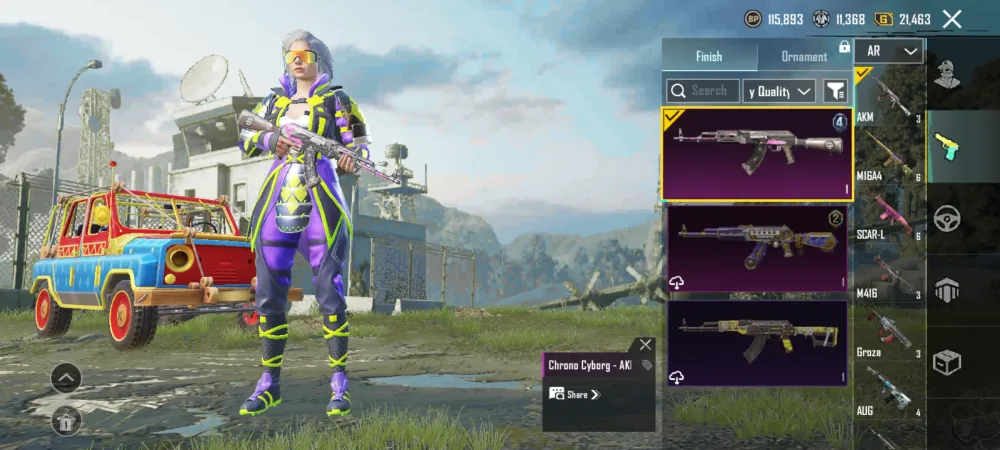
Weapon finishes
-
Character outfits
-
Helmets and backpacks
-
Vehicle appearances
-
Parachutes and accessories
Skins do not provide competitive advantages. Instead, they enhance immersion and personalization.
Official vs Community Creations
PUBG cosmetics fall into two major categories:
-
Official Skins
Designed by PUBG Studios and released through events, crates, or stores. -
Community Skins
Created by independent artists and designers, often selected through official submission programs.
Community created cosmetics are highly valued, but they must follow strict guidelines to be approved.
Is It Possible to Make Your Own Skin?
This is one of the most frequently asked questions online.
Short Answer
Yes, players can design their own skins, but they cannot upload them directly into live matches unless approved by PUBG Studios.
Long Answer
While personal designs can be created and showcased using design tools or private mods, official in-game usage requires approval. PUBG periodically opens community submission programs where artists can submit designs for potential inclusion in the game.
Requirements Before You Start Designing
Before jumping into the creative phase, it’s essential to prepare both technically and legally.
Skills You Should Have
-
Basic understanding of digital art
-
Familiarity with 3D models
-
Knowledge of texture mapping
-
Awareness of copyright laws
Tools You Will Need
Designing PUBG skins requires professional grade tools. Below are commonly used options:
-
3D modeling software for editing meshes
-
Texture painting software for surface detailing
-
Image editing tools for final touch ups
These tools help ensure high-resolution assets that meet official standards.
PUBG Skin Design Guidelines (Very Important)
PUBG has strict rules that every creator must follow.
Content Restrictions
Your design must NOT include:
-
Political symbols
-
Religious imagery
-
Hate speech
-
Explicit content
-
Copyrighted logos
Violation of these rules results in instant rejection.
Artistic Constraints
-
Color palettes must remain readable in combat
-
Designs must not reduce enemy visibility unfairly
-
Textures must align with PUBG’s realistic aesthetic
Step by Step Skin Creation Process
Step 1: Choose the Item Type
Decide what you want to design:
-
Weapon skin
-
Outfit
-
Backpack
-
Helmet
Each item type has different texture maps and complexity levels.
Step 2: Obtain the Base Model
PUBG provides base templates during official submission periods. These templates include:
-
UV maps
-
Mesh structure
-
Resolution requirements
Never extract models from the game files, as this violates PUBG’s terms.
Step 3: Concept Art and Planning
Before opening any software, plan your design:
-
Define the theme
-
Choose colors carefully
-
Sketch rough ideas
Professional creators spend significant time at this stage.
Step 4: Texture Creation
This is where creativity meets precision.
You must design textures that wrap perfectly around the model. This requires:
-
Seam alignment
-
Consistent resolution
-
Balanced wear and tear
Overly bright designs may be rejected.
Step 5: Applying Materials
Materials define how surfaces react to light. PUBG uses realistic shaders, so materials must simulate:
-
Metal roughness
-
Fabric softness
-
Plastic reflection
Incorrect values can make the skin look unrealistic.
Step 6: Quality Testing
Before submission, review your design for:
-
Texture stretching
-
Color mismatches
-
Visual bugs
Professional creators often test multiple variations.
Submission to PUBG Studios
When Can You Submit?
PUBG opens community submission portals during special events or creator programs. These are announced on official channels.
What You Must Submit
Typically required files include:
-
Texture files
-
Preview renders
-
Concept explanation
-
Creator details
Incomplete submissions are rejected automatically.
How PUBG Evaluates Skins
PUBG Studios evaluates designs based on:
-
Visual quality
-
Game compatibility
-
Originality
-
Performance impact
Only a small percentage of submissions are selected.
Monetization and Royalties
One of the biggest motivations for creators is earning potential.
How Creators Get Paid
If your design is selected:
-
It becomes part of the official store
-
You earn a revenue share
-
Your name appears in credits
Some community creators earn substantial income.
Common Mistakes to Avoid
Many submissions fail due to simple errors.
Frequent Errors
-
Using copyrighted material
-
Overly complex textures
-
Ignoring design guidelines
-
Low-resolution assets
Avoiding these mistakes increases acceptance chances.
PUBG Mobile vs PC Skin Creation
Key Differences
-
PUBG Mobile has stricter optimization rules
-
Texture sizes are smaller
-
Mobile skins must prioritize performance
Designs are not interchangeable between platforms.
Legal and Ethical Considerations
Creating custom content comes with responsibility.
Copyright Awareness
Always use original artwork. Never copy designs from:
-
Movies
-
Other games
-
Real-world brands
Plagiarism leads to permanent bans.
Frequently Asked Questions
Can custom skins be used in ranked matches?
Only officially approved skins are allowed in ranked gameplay.
Do skins affect gameplay performance?
No, skins are purely cosmetic.
Can beginners create PUBG skins?
Yes, but learning design fundamentals is essential.
Is there a cost to submit designs?
No, submission is free during official programs.
Future of Community Skins in PUBG
PUBG continues to expand its creator ecosystem. With increasing demand for unique cosmetics, community artists play a vital role in shaping the game’s visual identity.
Future updates are expected to offer:
-
More creator programs
-
Better submission tools
-
Higher revenue opportunities
This makes now an excellent time to start learning.

Conclusion
Designing personalized cosmetics for PUBG is a challenging yet rewarding journey. It combines artistic creativity with technical precision and strict compliance. While not every design gets approved, persistence and quality dramatically improve success rates.
By understanding guidelines, using professional tools, and focusing on originality, creators can transform their passion into recognition and even income within the PUBG ecosystem.